

Photographers need a memory card that can sustain fast writing, preserve large RAW files, and keep working through demanding shooting days. A card that looks impressive on its label may still perform poorly if its speed class, interface, or capacity does not match your camera.
We compared 3 options for Best SD Cards to Get for Photography, covering everyday cameras, burst shooting, and high-resolution video workflows. This guide explains which specifications matter most, where cheaper cards make sense, and how to avoid compatibility mistakes before your next shoot.
Photography equipment works best when every part of the workflow supports the next one, from the camera body to storage and travel accessories. Our guide to choosing luggage for international travel can also help if your equipment regularly travels between locations.


Best SD Cards to Get for Photography Buying Guide
1. Match the Card Interface to Your Camera
The interface determines how quickly your camera can move data onto the card and how rapidly your computer can transfer files afterward. UHS-I cards use one row of contacts, while UHS-II cards add a second row for substantially higher potential throughput.
A UHS-II card can work in many UHS-I devices, but the camera will generally operate at the slower interface limit. Check your camera manual for both the supported interface and the maximum card capacity before paying for performance the body cannot use.
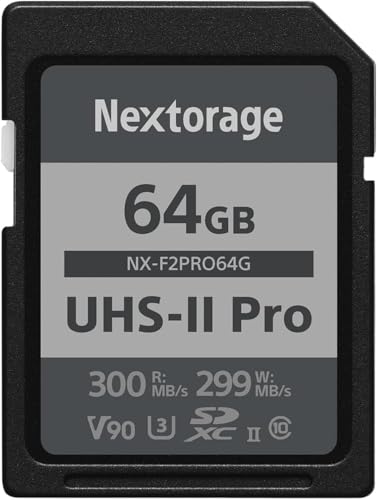
For a UHS-II camera used with long bursts or demanding video, the Nextorage Japan SD Card UHS-II 64GB Memory Card offers a more appropriate performance ceiling. For ordinary UHS-I cameras, a capable UHS-I card may deliver better value without creating a meaningful shooting disadvantage.
2. Prioritize Sustained Write Speed for Burst Photography
Write speed controls how quickly photographs leave the camera buffer and reach the card. This matters most when photographing wildlife, sports, weddings, or children, because a slow card can lengthen the pause before another burst becomes possible.
Do not confuse a card’s advertised read speed with its write speed. Read speed mainly affects transfers to a computer, while sustained write performance determines whether the camera can maintain continuous capture during a demanding sequence.
Use the camera’s maximum continuous frame rate as a practical guide, but remember that RAW files are much larger than JPEG files. If your camera produces 40 megabytes per RAW image and captures ten images each second, the workflow briefly needs roughly 400 megabytes per second before buffer behavior is considered.
3. Understand V30, V60, and V90 Video Ratings
Video Speed Class ratings describe minimum sustained write performance rather than a short peak. V30 guarantees at least 30 megabytes per second, V60 raises that floor to 60, and V90 raises it to 90 under the relevant testing conditions.
For Full HD and many moderate 4K recording modes, V30 is often sufficient when the camera manufacturer lists it as compatible. High-bitrate 4K, 6K, 8K, and specialized intra-frame formats may need V60 or V90, so select the card from the camera’s recording requirements rather than its advertised capacity.
The Nextorage card carries a V90 rating, making it the strongest fit in this group for demanding video and fast hybrid shooting. A higher class costs more, but it can prevent dropped frames and recording interruptions when the camera writes unusually large data streams.
4. Choose Capacity Around Your Shooting Pattern
Capacity should reflect file size, shooting duration, and how often you can safely offload images. A photographer creating large RAW files may fill a card faster than someone capturing compressed JPEGs, even when both shoot the same number of frames.
Estimate storage by multiplying the average file size by the number of photographs you expect to capture, then leave meaningful headroom for unexpected opportunities. For video, divide usable capacity by the camera’s recording bitrate, remembering that manufacturers express capacity and bitrate using different measurement conventions.
A larger card reduces the need to change media during a session, but using several smaller cards can limit the number of files lost if one card fails. For travel or once-in-a-lifetime events, rotate cards and back up during breaks instead of trusting one card for the entire assignment.
| Photography need | Useful priority | Practical direction |
|---|---|---|
| Everyday JPEG shooting | Compatibility and capacity | A dependable UHS-I card is usually adequate |
| RAW burst photography | Write speed and interface | Favor higher sustained performance |
| 4K video | Video Speed Class | Confirm the camera’s minimum rating |
| 8K or high-bitrate video | V90 or manufacturer-approved media | Use a professional-grade card when required |
5. Compare Real Transfer Speed, Not Just Peak Numbers
Fast transfer speeds reduce the time spent moving photographs from a card to a computer, especially after a long event or multi-day trip. However, the card reader, computer port, cable, operating system, and file destination can all become bottlenecks.
The SANDISK 256GB Extreme PRO SD Memory Card lists read performance up to 200MB/s through SanDisk QuickFlow technology when paired with compatible equipment. That figure is useful only when the reader and host system can support the same higher-than-standard UHS-I workflow.
For reliable comparisons, look for both read and write specifications, then check whether the manufacturer qualifies them as maximum or sustained results. A fast card reader can make a larger practical difference than upgrading a card whose transfer speed is already limited by your existing hardware.
6. Evaluate Durability for Your Shooting Environment
Memory cards travel through camera bags, humid locations, dusty trails, crowded venues, and sometimes accidental drops. Water resistance, dust resistance, shock protection, and resistance to magnetic or X-ray exposure can reduce risk when conditions become unpredictable.
Durability claims are most useful when they identify the types of testing completed rather than simply promising that a card is rugged. The Nextorage card lists protection against water, dust, shock, bending, X-rays, ultraviolet exposure, magnetic fields, and electrostatic hazards.
Durability does not replace careful handling or backups, and a damaged camera slot can still affect any card. Keep cards in a protective case, avoid removing them while the access light is active, and format them in the camera after confirming that files are safely stored.
7. Consider Endurance and Data Retention
Endurance describes how well flash memory tolerates repeated writing and rewriting over time. This becomes important for professionals who fill cards regularly, photographers who reformat frequently, and users who record extended video sessions.
The Nextorage model uses professional-grade pSLC NAND, which is designed for higher endurance and data retention than ordinary memory designs. That feature is especially relevant when reliability and consistent performance matter more than selecting the least expensive option.
Even an endurance-focused card should not be treated as permanent storage. Copy important files to at least two separate destinations, verify that the copies open correctly, and retire media that begins producing errors or behaving inconsistently.
8. Check Camera Compatibility and Formatting
Compatibility includes more than physical size, because cameras impose limits on capacity, filesystem format, bus speed, and recording modes. A card may fit the slot yet fail to support the camera’s fastest burst or highest video setting.
Review the camera maker’s approved media guidance, particularly for professional bodies and high-resolution video cameras. The Nextorage card is described as compatible with major Canon, Nikon, Sony, Fujifilm, Olympus, and Panasonic cameras, while also supporting older UHS-I devices.
After inserting a new card, format it inside the camera rather than relying on a computer’s default format. If you change cameras, back up the card first and format it again so the new body can create the folders and filesystem structure it expects.
9. Match Performance to Your Actual Camera
Not every photographer needs the fastest available card, and excess performance does not automatically improve image quality. A compact camera capturing occasional JPEGs may benefit more from dependable capacity and a good reader than from a professional V90 specification.
The SANDISK 256GB Ultra SD Memory Card is positioned for compact to mid-range point-and-shoot cameras and supports Full HD recording with a U1, Class 10 rating. It is therefore a sensible match for lighter workloads that do not require fast RAW bursts or advanced high-bitrate video.
For an enthusiast body that captures RAW files and occasional 4K footage, the SANDISK 256GB Extreme PRO SD Memory Card provides a stronger middle ground. Select the Nextorage card when your camera and shooting style can genuinely use UHS-II and V90 performance.
Why You Should Trust Us
We shortlisted these memory cards by comparing published interface standards, capacity, stated read and write performance, video classifications, durability features, and compatibility information. We focused on specifications that change a photographer’s workflow rather than repeating broad marketing language.
Our comparison also separates everyday UHS-I use from professional UHS-II workloads, because the most expensive specification is not automatically the most appropriate choice. Product details, availability, and performance claims can change, so we keep the guide structured around verifiable features and practical buying decisions.
We do not claim to have physically tested these products, and we have not invented laboratory results. Instead, our recommendations connect the supplied manufacturer specifications with common photography needs, giving you a transparent way to confirm the final choice against your own camera manual.
Final Thoughts
Our best overall recommendation is the Nextorage Japan SD Card UHS-II 64GB Memory Card for photographers whose cameras support UHS-II. Its pSLC NAND, V90 certification, fast stated transfer performance, and extensive durability testing make it the most capable option for demanding hybrid work.
Our best value pick is the SANDISK 256GB Extreme PRO SD Memory Card for photographers using compatible UHS-I cameras. Its large capacity, U3 and V30 classifications, fast stated read performance, and support for burst photography create a balanced choice for stills and everyday 4K recording.
For compact and mid-range cameras, the SANDISK 256GB Ultra SD Memory Card is the best choice for a simpler workload. Its Class 10 and U1 rating suits Full HD video and routine photography, while the generous capacity helps reduce frequent card changes.
Before ordering, confirm your camera’s slot type, maximum capacity, and required video rating. Photographers carrying equipment across borders may also benefit from our international travel luggage guide, while broader shopping advice is available through the Uncategorized review collection.
FAQs
What are Best SD Cards to Get for Photography in 2026?
The right card depends on your camera and shooting style rather than one universal ranking. UHS-II and V90 performance suits demanding bursts and video, while a dependable UHS-I card is often enough for everyday photographs.
Is a UHS-II card worth buying for still photography?
It can be worthwhile when your camera supports UHS-II and you regularly shoot long RAW bursts. If your camera only has a UHS-I interface, the additional interface capability may not improve in-camera writing.
Does a faster SD card improve image quality?
No, card speed does not change the optical quality, resolution, or color captured by the camera. It can improve responsiveness by clearing the buffer sooner and reducing transfer time after a shoot.
How much SD card capacity does a photographer need?
Capacity depends on file size, shooting frequency, and how often you can back up. Estimate your expected files for a session, then leave room for unexpected scenes instead of filling the card completely.
Is V30 enough for photography and video?
V30 is commonly suitable for many 4K modes and routine hybrid shooting when the camera specifies that rating. Higher-bitrate formats, including some 8K settings, may require V60 or V90 media.
Can a UHS-II SD card work in a UHS-I camera?
Many UHS-II cards are backward compatible with UHS-I devices. They will generally operate at the slower UHS-I interface speed, so check the camera manual before expecting the card’s full performance.
Should photographers use one large card or several smaller cards?
One large card is convenient, but several cards can reduce the amount of work lost if a card fails. For important assignments, rotate cards and back up files during natural breaks whenever possible.
How should a new memory card be prepared?
Confirm that the card matches the camera, insert it with the power off when appropriate, and format it using the camera’s own menu. Always verify that existing files are backed up before formatting any previously used card.
Are advertised read speeds guaranteed in every camera?
No, advertised read speeds are maximum figures achieved under compatible conditions. The reader, port, cable, computer, card capacity, and software can all reduce actual transfer performance.
Which SD card is suitable for a point-and-shoot camera?
A dependable UHS-I card with adequate capacity is usually sufficient for compact and mid-range point-and-shoot models. Confirm the camera’s capacity limit and video requirement, especially when recording Full HD footage.



