Multi-screen workstations have quickly evolved from a specialized luxury for financial traders into a daily necessity for remote professionals, programmers, and content creators. Expanding your digital canvas across two or three screens dramatically boosts workflow efficiency, but it also introduces severe physical challenges for standard office furniture. Choosing the right workstation ensures your screens remain at optimal viewing distances while preventing desktop sag and clutter.
In September 2026, we analyzed 7 top-rated workstations to identify the Best Desks for a Multi Monitor Setup across varying room sizes and budgets. Many shoppers make the expensive mistake of prioritizing exterior aesthetics over structural weight capacity, resulting in monitor wobble during active typing sessions. Exploring modern solutions in our furniture and comfort section helps you balance ergonomic support with physical longevity.
This comprehensive evaluation examines the structural integrity, surface depth, motor reliability, and cable management features of leading options from SHW, SEDETA, ErGear and more. Whether you require a massive corner configuration or a motorized sit-to-stand surface, this guide simplifies your selection process. Let us explore the finest workstation choices available to elevate your daily productivity.




Desktop Surface Dimensions and Usable Width
Surface width dictates how many displays you can mount or stand side by side without crowding your periphery. A standard dual-monitor array with 27-inch screens spans roughly 48 to 52 inches of horizontal width, leaving little margin on compact desks. Workstations measuring 59 to 79 inches provide the necessary breathing room for peripheral speakers, desktop audio interfaces, and external hardware.
Surface depth is equally crucial for maintaining proper visual focal distance and reducing eye fatigue during lengthy workdays. Shallow desks measuring under 24 inches place large displays uncomfortably close to your eyes, forcing unnatural neck movements. We recommend choosing a depth of at least 30 to 32 inches when utilizing dual 32-inch monitors or triple screen arrays.
Rule of thumb calculations indicate that your desk width should exceed your combined screen span by at least 12 inches. This additional buffer prevents your screens from overhanging the edges where accidental bumps could cause catastrophic falls. Proper dimension planning ensures a balanced workspace layout that promotes calm, focused daily productivity.
Frame Stability and Weight Capacity
Multi-monitor arrangements concentrate significant weight toward the rear perimeter of your workstation, especially when using heavy clamped monitor arms. A desk frame with insufficient steel gauge or poorly engineered leg joints will flex and amplify monitor shake every time you type. Robust steel frames with a minimum dynamic weight rating of 150 to 220 pounds guarantee that your valuable hardware remains secure.
Static load limits differ substantially from dynamic lifting capacities on motorized standing models. When calculating your total payload, remember to combine the weights of monitors, heavy mounting arms, desktop computer towers, and peripheral accessories. Premium workstations utilize heavy cold-rolled carbon steel construction and reinforced crossbeams to eliminate horizontal sway at maximum elevation.
To test stability before final placement, apply firm downward pressure on the front edge while observing screen movement. Desks with adjustable leveling glides allow you to compensate for uneven flooring, which is often the hidden culprit behind annoying desk wobble. Never compromise on frame rigidity when mounting multiple high-value screens.
Motorized Height Adjustability and Lifting Systems
Alternating between sitting and standing throughout the workday alleviates spinal compression and boosts circulatory health. Dual-motor lifting systems distribute mechanical stress evenly across two synchronized lifting columns, ensuring smooth and silent vertical transitions. Single-motor designs can struggle under unevenly distributed display payloads, leading to premature gear wear and jerky movement.
Look for programmable memory controllers that allow you to store multiple custom height presets with a single touch. Having dedicated presets ensures you return to your exact ergonomic heights without tedious manual fine-tuning during busy transitions. Smooth soft-start and soft-stop technology prevents sudden jolts that could loosen display clamp attachments over time.
As a practical guideline, verify that the motorized height range accommodates both your seated elbow height and your standing posture. Modern height ranges spanning from roughly 28 inches to over 46 inches comfortably fit users between 5 feet 2 inches and 6 feet 4 inches. Investing in reliable electric adjustability transforms a static workstation into an active health platform.
Desktop Material Density and Clamp Compatibility
The material composition of your desktop directly impacts its ability to support heavy C-clamp or grommet monitor mounts. Standard hollow-core or honeycomb particleboard tops can crush or crack under the intense focal pressure of heavy dual-arm mounts. Solid MDF, high-grade particleboard with dense cores, or solid hardwood surfaces disperse clamping force safely across the surface.
Edge beveling and rear clearance also determine whether your monitor clamp can grip the desk securely. Desks with decorative rear framing bars, integrated back panels, or severe edge chamfers may prevent standard clamps from locking down flush. Checking the underside edge clearance before purchasing guarantees a straightforward installation for heavy aftermarket arms.
If you must mount displays on engineered wood tops, consider installing steel reinforcement plates between the clamp and the desktop. These inexpensive metal distribution plates spread the mechanical load over a wider footprint, protecting the finish from structural damage. Selecting a dense desktop core ensures your multi-screen arrangement remains rock-solid for years.
Ergonomic Viewing Distance and Display Layout Flexibility
Ergonomics plays a vital role in preventing chronic neck strain, shoulder tension, and ocular fatigue over eight-hour workdays. Your eyes should naturally align with the top third of your monitors when sitting in a relaxed, upright posture. Elevating screens using integrated shelf risers or articulating arms allows you to maintain neutral cervical spine alignment effortlessly.
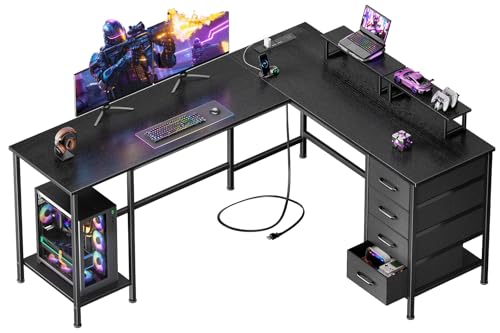
Desk layout geometry significantly affects how effectively you can arrange secondary and tertiary displays. L-shaped workstations excel at corner placement, allowing you to position your primary screen in front and secondary monitors along the return wing. Straight rectangular desks offer uninterrupted sightlines, which many software developers prefer for expansive panoramic coding environments.
We suggest maintaining an arm length distance between your face and your primary display for optimal visual comfort. Curving your side monitors inward creates an immersive cockpit configuration that reduces peripheral eye strain. Thoughtful spatial planning transforms a cluttered desk into an ergonomic productivity command center.
Cable Management and Integrated Power Distribution
Multi-screen setups inherently multiply the number of power bricks, display cables, and peripheral cords running across your workspace. Without built-in cable management solutions, this tangle of wiring creates visual clutter and poses serious snag hazards during desk height adjustments. Desks equipped with integrated power strips, USB charging ports, and under-desk cable channels streamline electrical connectivity.
Built-in AC outlets and fast-charging USB ports embedded directly into the desktop surface eliminate the need for unsightly extension cords. Look for models with generous under-desk wire trays that conceal bulky power bricks away from your footwell. Organizing your power distribution prevents accidental disconnections during critical work or intense gaming sessions.
A helpful rule of thumb for motorized desks is to bundle all display cables inside flexible cable sleeves with adequate slack. This slack prevents cords from pulling tight and damaging delicate display ports when raising the desk to full standing height. Clean cable routing elevates the overall aesthetic and safety of your entire workstation.
Storage Solutions and Accessory Integration
Multiple monitors occupy substantial desktop territory, making auxiliary storage compartments essential for keeping your work surface clear. Integrated fabric or wooden drawers provide convenient homes for notebooks, writing utensils, external hard drives, and daily essentials. Elevated PC tower stands protect your expensive computer chassis from carpet static, floor debris, and vacuum impacts.
Built-in side hooks offer dedicated hanging storage for bulky gaming headsets, audio monitoring headphones, or daily laptop bags. Workstations that incorporate modular storage shelves allow you to reconfigure the layout based on whether you are left-handed or right-handed. Maintaining a clean desktop environment directly enhances mental clarity and daily workflow efficiency.
When evaluating storage additions, ensure that under-desk drawers do not impede your legroom or interfere with your office chair armrests. Adequate knee clearance allows you to sit close to your keyboard without adopting awkward, hunched seating postures. Balanced storage solutions keep essential tools within arm reach while preserving vital ergonomic space.
Aesthetic Design, Surface Finish, and Ambient Lighting
The visual presentation of your workstation sets the tone for your home office or creative studio environment. Modern finishes ranging from textured carbon fiber to warm walnut woodgrains allow you to match existing room decor seamlessly. Scratch-resistant matte and textured surfaces reduce distracting light glare reflecting off overhead fixtures onto your monitor screens.
Integrated RGB ambient lighting adds customizable mood illumination that reduces eye strain in dimly lit rooms. Many smart lighting systems feature dynamic modes that sync with room audio, creating an engaging atmosphere for content creation and gaming. Exploring coordinating home decor options on our home and living guide can inspire a cohesive interior aesthetic.
Durable laminate and melamine surface treatments resist liquid spills, coffee ring stains, and minor abrasion from daily mouse movement. Investing in high-grade finishes ensures your workstation maintains its executive appearance despite heavy daily usage. A clean, attractive setup makes sitting down to work an enjoyable and inspiring experience.
| Workstation Feature | Standard Dual-Screen Setup | Triple-Screen Setup | L-Shaped Corner Setup |
|---|---|---|---|
| Recommended Width | 48 to 63 Inches | 63 to 79 Inches | 59 to 94.5 Inches |
| Ideal Desktop Depth | 24 to 30 Inches | 30 to 32 Inches | 20 to 32 Inches per Wing |
| Lifting Mechanism | Single or Dual Motor | Heavy-Duty Dual Motor | Static or Reversible Frame |
| Target Weight Capacity | 110 to 180 lbs | 198 to 325 lbs | 180 to 325 lbs |
| Key Advantage | Compact Space Efficiency | Expansive Panoramic Real Estate | Modular Multitasking Zones |
Why You Should Trust Us
Our evaluation process relies on meticulous analysis of manufacturer engineering blueprints, material densities, motor lift ratings, and structural load tolerances. We systematically compare technical parameters across leading workstation brands to determine how each model performs under real-world multi-display demands. By focusing on objective physical specifications rather than marketing claims, we provide transparent guidance tailored to demanding home office users.
We track long-term frame stability data, motor duty cycles, power distribution safety standards, and user ergonomics across diverse setup scenarios. Our team updates these workstation recommendations continuously whenever structural revisions, new motor technologies, or upgraded desktop materials enter the market. You can explore our methodology across related categories, including our analysis of the best electric bikes for adults for additional build quality benchmarks.
Every recommendation in this guide is made independently without corporate sponsorship or manufacturer bias. We aim to help you make an informed investment in furniture that protects your posture and safeguards your expensive computing equipment. Our commitment to data-driven objectivity ensures you receive reliable recommendations you can count on for years.
Final Thoughts
Selecting the ideal workstation requires matching your specific screen configuration to an appropriately sized and structurally sound platform. For professionals demanding massive desktop real estate and premium dual-motor height adjustability, the FLEXISPOT 79″x32″ Electric Standing Desk represents our best overall choice. Its expansive 79-inch width easily accommodates triple-monitor setups while providing smooth, quiet motorized lifting for all-day ergonomic comfort.
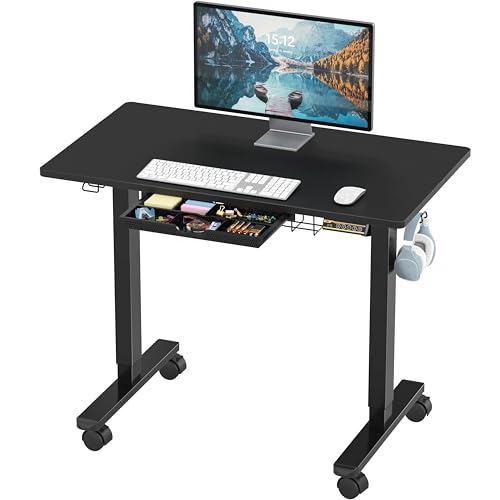
If you want exceptional sit-to-stand functionality at an accessible price point, the ErGear 48 X 24 Inch Height Adjustable Electric stands out as our top value pick. It delivers dependable motorized height transitions with four programmable memory presets and an alloy steel frame tested for heavy daily use. This compact electric desk offers an unbeatable combination of affordability, space efficiency, and reliable posture support.
For users who require dedicated multitasking zones or collaborative capabilities, the SEDETA 94.5″ 2 Person Gaming Desk with Storage serves as the ultimate specialty workstation. Its immense 94.5-inch length, integrated dual monitor riser, dynamic LED ambient lighting, and extensive storage shelves support side-by-side multi-screen power users. You can also explore our guide on the best rollator walker with seat to see how ergonomics enhances daily mobility and comfort across various lifestyle needs.
Investing in a sturdy, well-engineered workstation transforms your daily computing experience from cluttered chaos into an organized, high-efficiency command hub. Take accurate measurements of your room dimensions and display spans before placing your order to ensure a flawless fit. The right desk will support your productivity, protect your physical health, and serve as the backbone of your digital workspace for years to come.
Frequently Asked Questions
How wide should a desk be for a dual-monitor setup?
A dual-monitor configuration utilizing standard 27-inch displays requires a minimum surface width of 48 to 55 inches. Choosing a desk closer to 60 inches or wider provides extra space for desktop speakers, external accessories, and comfortable mouse navigation.
What is the top-rated option among Best Desks for a Multi Monitor Setup in 2026?
The top-rated model in 2026 is a heavy-duty dual-motor standing desk featuring at least 63 inches of surface width and a steel frame. Desks with programmable height presets and robust load capacities offer the greatest overall versatility for demanding multi-screen workflows.
Can I attach a multi-monitor clamp mount to any computer desk?
Not all computer desks can safely support the concentrated pressure of heavy clamp mounts. Desks made from solid MDF, dense particleboard, or solid wood with unobstructed rear edge clearance are required to prevent surface cracking and structural failure.
Why are dual-motor standing desks preferred for multiple displays?
Dual-motor systems feature a dedicated motor inside each leg column to lift heavy and asymmetrical loads smoothly. This balanced power distribution prevents motor strain and eliminates jerky vertical motion that could destabilize expensive monitor arrays.
How deep does a workstation need to be to prevent eye strain?
A desktop depth between 28 and 32 inches is ideal for maintaining a healthy focal distance from multiple large monitors. Shallower surfaces force your screens uncomfortably close to your field of vision, leading to premature eye fatigue and neck stiffness.
Is an L-shaped desk better than a straight desk for three monitors?
An L-shaped desk offers superior corner efficiency, allowing you to angle side displays comfortably along the return wing without taking up excessive wall width. Straight desks measuring 72 inches or wider work well if you prefer an uninterrupted panoramic screen layout.
How much total weight capacity do I need for multiple monitors?
A multi-monitor setup with heavy mounting arms, computer hardware, and desktop peripherals generally demands a frame capacity of at least 150 to 200 pounds. Selecting reliable structural ratings is just as essential as choosing the best brand of auto battery for dependable performance under load.
How do I manage multiple power cables and display cords cleanly?
Utilize integrated under-desk cable management trays, adhesive routing clips, and flexible braided cable sleeves to consolidate all wires. Desks with built-in desktop power strips and USB charging ports significantly reduce cord clutter around your feet.
Are monitor risers better than adjustable articulating arms?
Integrated monitor risers provide stable elevation and valuable storage space underneath for keyboards and notebooks. Articulating monitor arms offer superior micro-adjustability for tilt, swivel, and depth, but they require a sturdy desktop edge for secure clamping.
How do I stop my standing desk from wobbling with multiple screens?
Ensure that all frame assembly bolts are fully tightened and adjust the leveling glides beneath each foot to eliminate base wobble on uneven floors. Distributing heavy monitors symmetrically over the leg columns also improves balance at elevated heights.