

Drivers who regularly travel beyond dependable cellular coverage can benefit from a dedicated navigator that stays focused on the road. A separate screen also preserves your phone battery, reduces app interruptions, and keeps turn guidance visible without juggling another device.
Our comparison of 7 models covers compact Garmin units, larger truck-ready navigators, and affordable systems with vehicle-specific routing. The important differences are not simply screen size or brand recognition, but map coverage, update access, mounting practicality, routing controls, and how clearly each device communicates upcoming decisions.
Navigation shoppers often assume every unit offers identical directions, then discover that some require a phone connection while others work offline. This guide explains those trade-offs and helps you match a navigator to commuting, road trips, commercial driving, or RV travel. For related vehicle buying advice, see our guide to car brands for reliability when buying used.


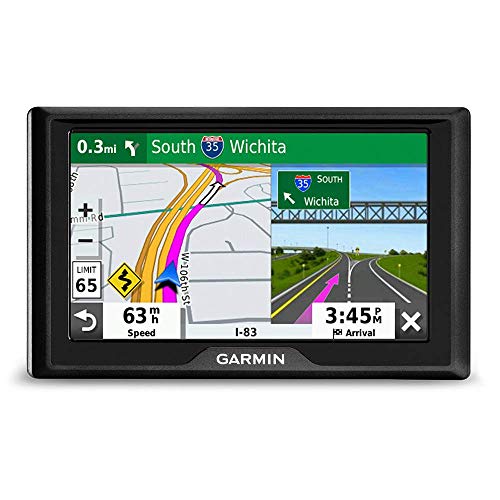


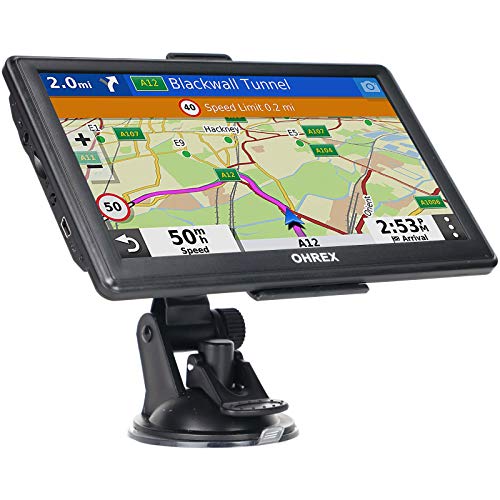
Best Car GPS Navigation Systems under $500 Buying Guide
1. Offline Map Coverage and Update Policy
Offline navigation is the foundation of a dedicated GPS because route guidance should continue when mountains, rural highways, or international travel interrupt mobile service. Check whether maps are preloaded for the regions you actually drive, rather than assuming North America coverage includes every useful road detail.
Map updates matter because roads change, businesses relocate, speed limits are revised, and new developments alter traffic patterns. Compare the update method, update frequency, and whether lifetime access is included or tied to a separate subscription before choosing a seemingly inexpensive unit.
Garmin Drive 52, GPS Navigator with 5 inch and Garmin Drive™ 53 GPS Navigator provide North America map updates, while several OHREX, Jimtour, and Wrynthyl models advertise lifetime updates. Treat “lifetime” as a product support promise and verify the required computer, memory card, or software process.
A practical rule is to prioritize update clarity over a long feature list. If you frequently travel between the United States, Canada, and Mexico, confirm all three areas are included instead of paying later for missing regional data.
2. Vehicle-Specific Routing
Cars can follow most ordinary roads, but trucks, trailers, and RVs face low bridges, narrow lanes, weight limits, and restricted commercial routes. A navigator with vehicle dimensions can avoid hazards that a standard passenger-car profile may not recognize.
When comparing specifications, look for editable height, width, length, and weight fields rather than a vague claim about truck support. The more dimensions you can enter, the more useful routing becomes for an oversized vehicle or a vehicle towing equipment.
OHREX N700 GPS Navigator for Car Truck RV,Truck supports route customization based on vehicle measurements and restrictions. Jimtour GPS Navigator for Car offers seven vehicle modes, while GPS Navigator for Car Truck RV, 7 inch Touchscreen supports car, truck, RV, pickup, and commercial profiles.
Do not treat custom routing as permission to ignore road signs. Enter conservative dimensions, keep your vehicle profile current, and confirm every critical clearance visually because mapping databases cannot capture every temporary restriction.
3. Screen Size, Brightness, and Mounting Position
A larger display makes lane guidance, upcoming exits, and map labels easier to read, especially in a truck or RV with more dashboard distance. However, a large screen can block sightlines or occupy valuable space in a compact car.
Five-inch screens are usually easier to position near the driver, while seven-inch displays favor quick glances from farther away. Resolution, contrast, touch responsiveness, and automatic day and night modes can matter as much as diagonal measurement.
Garmin DriveSmart 66, 6 inch Car GPS Navigator uses a six-inch high-resolution display, and Garmin DriveSmart 76, 7 inch Car GPS Navigator expands viewing area for larger vehicles. The smaller Garmin units emphasize bright maps and simple menus for less complicated installation.
Before buying, measure the dashboard area around your intended mount and check the cable path. Position the screen within a short glance, never in front of the windshield view, and make sure suction or dashboard mounting remains stable over rough pavement.
4. Route Guidance and Search Tools
Good navigation turns a route into decisions you can understand quickly. Spoken turn-by-turn directions, lane guidance, landmark instructions, and readable arrows reduce the need to stare at the screen while approaching a complicated interchange.
Search flexibility is equally important when an exact street address is unavailable. Compare support for ZIP codes, points of interest, coordinates, saved favorites, nearby fuel, rest areas, restaurants, and alternate routes.
Garmin Drive™ 53 GPS Navigator adds landmark-based Garmin Real Directions and shows food, fuel, rest areas, cities, and milestones along active routes. Jimtour GPS Navigator for Car supports address, ZIP code, POI, and coordinate searches for more flexible destination entry.
For frequent travelers, favor a system that makes destination entry predictable rather than one with the longest specification sheet. Try entering a business category, a rural address, and a saved destination before deciding which interface feels fastest.
5. Traffic, Smartphone Dependence, and Connectivity
Some navigators provide basic offline directions independently, while advanced traffic and live information may require Bluetooth pairing, Wi-Fi, or a companion phone application. Understand this distinction because “GPS navigation” does not automatically mean live congestion data.
Garmin Drive 52, GPS Navigator with 5 inch is traffic-ready without a smartphone according to its listed features. Garmin DriveSmart 66, 6 inch Car GPS Navigator and Garmin DriveSmart 76, 7 inch Car GPS Navigator can access live traffic, fuel prices, parking, weather, and notifications when paired with a compatible phone.
Wi-Fi can simplify map and software updates, while Bluetooth enables hands-free calling or app communication. These conveniences are worthwhile if you already keep a phone connected, but they should not replace offline route capability for remote travel.
Choose independent operation when reliability and privacy are priorities. Choose connected features when traffic avoidance, current fuel information, and smart notifications are more valuable than minimizing phone involvement.
6. Driver Alerts and Audio Clarity
Driver alerts can call attention to school zones, sharp curves, speed changes, cameras, and other conditions before they become urgent. They supplement attentive driving, but they do not replace signs, local laws, or sensible speed control.
Evaluate whether alerts are visual, spoken, adjustable, and easy to distinguish from ordinary turns. Too many warnings can become distracting, while overly quiet audio may be missed over ventilation, conversation, or road noise.
Garmin DriveSmart 66, 6 inch Car GPS Navigator and Garmin DriveSmart 76, 7 inch Car GPS Navigator combine driver alerts with voice assist. OHREX N700 GPS Navigator for Car Truck RV,Truck lists speed camera and real-time alerts, while Wrynthyl lists speed, red-light, curve, lane, and school-zone notifications.
If your vehicle stereo is quiet, consider FM transmission or a clear built-in speaker. GPS Navigator for Car Truck RV, 7 inch Touchscreen includes FM audio transmission, which can make spoken directions easier to hear through compatible vehicle speakers.
7. Power, Accessories, and Installation
A navigator is only useful when it starts reliably and stays powered throughout the journey. Check the included vehicle charger, cable length, connector placement, and whether the mount allows easy adjustment toward the driver.
Long routes expose weak installation choices quickly, especially when a cable pulls against the mount or the screen vibrates over uneven roads. A dual USB charger can also preserve a charging port for a phone or tablet during family trips.
Garmin DriveSmart 66, 6 inch Car GPS Navigator and Garmin DriveSmart 76, 7 inch Car GPS Navigator include a dual USB charger, while Jimtour GPS Navigator for Car lists mounting hardware and charging cables. Compare what is included rather than assuming every product arrives with identical accessories.
Install the device while parked and test visibility from your normal driving position. Leave enough slack for steering-wheel movement and avoid routing wires across controls, pedals, airbags, or the driver’s direct view.
8. Extra Travel Features and Everyday Usability
Road-trip databases can make a navigator more useful after the main route is planned. Historic sites, national parks, traveler ratings, fuel stops, and points of interest help turn a basic trip into a more flexible itinerary.
Garmin Drive 52, GPS Navigator with 5 inch includes a national parks directory, HISTORY sites, TripAdvisor ratings, and Foursquare points of interest. The newer Garmin models add similar travel resources, voice assist, and connected convenience features.
Usability depends on whether menus remain understandable while driving, favorites are easy to save, and route changes do not require excessive screen interaction. Simple menus may be preferable for older drivers, occasional users, or anyone replacing a phone-based setup.
Prioritize the features you will use every week. A long list of entertainment or database functions cannot compensate for slow destination entry, confusing alerts, or a mount that repeatedly loses its position.
| Driving situation | Most important features | Useful direction |
|---|---|---|
| Daily commuting | Clear screen, quick search, simple menus | Favor compact, easy-to-read Garmin navigation |
| Long road trips | Offline maps, travel databases, route alternatives | Consider Garmin units with trip features |
| Truck or RV travel | Dimensions, clearance avoidance, large display | Consider OHREX, Jimtour, or Wrynthyl routing |
| Remote routes | Independent operation, lifetime map support | Verify regional coverage and update process |
Why You Should Trust Us
We compared the listed models by examining their documented screen specifications, map coverage, update policies, routing controls, alerts, connectivity, accessories, and intended vehicle types. We organized those details around decisions that affect real installation and driving rather than repeating manufacturer marketing language.
Our shortlist includes products across different feature tiers and use cases, from compact passenger-car navigators to larger systems designed for trucks and recreational vehicles. We separate independently available navigation from features that require a compatible smartphone, because that difference changes reliability and ongoing convenience.
We do not claim hands-on testing where the supplied information does not support it. Instead, we identify documented strengths, practical limitations, and questions shoppers should verify before purchase, while dynamic product information keeps the comparison current over time.
Final Thoughts
Our best overall choice is Garmin Drive™ 53 GPS Navigator, because it balances a bright five-inch display, North America updates, landmark guidance, driver alerts, and useful trip information. It suits commuters and road trippers who want a clear interface without moving to the largest screen.
For a value-focused buyer, Auto & Vehicles buying guides provide useful context, while Jimtour GPS Navigator for Car stands out for flexible vehicle modes, voice prompts, multiple searches, and included mounting accessories. It is especially appealing when basic navigation and truck routing matter more than premium connected features.
For larger vehicles, OHREX N700 GPS Navigator for Car Truck RV,Truck is a strong specific-use option because its seven-inch screen, offline operation, lifetime map updates, and dimension-based route customization address commercial and RV concerns. Garmin DriveSmart 76, 7 inch Car GPS Navigator is another sensible large-screen choice when voice assist, Wi-Fi updates, and smartphone-connected travel information matter.
Drivers wanting a six-inch connected Garmin can consider Garmin DriveSmart 66, 6 inch Car GPS Navigator, while Garmin Drive 52, GPS Navigator with 5 inch emphasizes simple menus and traffic-ready guidance. GPS Navigator for Car Truck RV, 7 inch Touchscreen adds vehicle profiles and FM audio transmission for buyers prioritizing a large, adaptable display.
FAQs
Are dedicated GPS navigators still useful when phones have navigation apps?
Yes, dedicated units can provide a larger, distraction-reduced display and continue guiding without dependable cellular service. They also preserve phone battery and keep calls or notifications from interrupting directions.
Do these car GPS systems work without internet access?
Models with preloaded offline maps can calculate and provide directions without an active cellular connection. Connected features such as live traffic, weather, or fuel information may still require a paired phone or other connection.
Which screen size is easiest to read in a car?
A five-inch screen is often convenient in smaller vehicles, while six- and seven-inch displays are easier to read from a larger dashboard or RV seating position. Mount placement, brightness, contrast, and viewing angle are just as important as diagonal measurement.
Can a GPS navigator route trucks around low bridges?
Some models support truck or RV profiles that use entered height, width, length, and weight information to avoid mapped restrictions. You should still check signs and current road conditions because databases may not include temporary hazards.
What does lifetime map updating usually mean?
It generally means the manufacturer provides updates for the supported product’s service life without charging a separate map subscription. The update may require a Windows computer, a memory card, Wi-Fi, or specific software, so review the process before purchasing.
Can GPS directions play through the car speakers?
Some units use built-in speakers, Bluetooth, or FM transmission to make spoken guidance easier to hear. FM transmission can be useful when the navigator’s built-in speaker is too quiet for a noisy truck or family vehicle.
What is the top-rated option among Best Car GPS Navigation Systems under $500 in 2026?
The Garmin Drive™ 53 GPS Navigator is a balanced choice for many drivers because it combines a bright display, clear spoken guidance, alerts, updated maps, and useful road-trip information. Larger vehicles may benefit more from a seven-inch model with vehicle-specific routing.
Are speed camera and red-light alerts legal everywhere?
Laws concerning camera alerts vary by location, and some jurisdictions restrict or prohibit their use. Treat alerts as informational, check local regulations, and always obey posted speed limits and traffic signals.
How should a GPS navigator be mounted safely?
Mount it where you can glance briefly without blocking the windshield, airbags, controls, or road view. Secure the cable away from pedals and steering movement, then test the position while parked before driving.
Does a larger GPS screen always mean better navigation?
Not always, because a large display can obstruct visibility or feel excessive in a compact car. Choose the largest screen that fits safely and remains easy to reach without encouraging prolonged glances.



