Families, photographers, gamers, and anyone using wireless accessories can quickly accumulate a drawer full of depleted AA and AAA batteries. A suitable charger reduces waste, keeps replacement cells organized, and helps you avoid discovering an empty battery when an important device needs power.
Our guide to Best Battery Charger for AA and AAA Batteries compares 3 Ostation options across compatibility, charging control, organization, monitoring, and safety. The category now includes smart lithium cells alongside familiar NiMH batteries, so matching the charger to the battery chemistry matters more than choosing the cheapest-looking unit.
We also explain which features genuinely change daily use and which specifications may sound impressive without solving a practical problem. If you are upgrading other household equipment, our Home and Living category guides provide additional buying advice for everyday products.

Buying Guide for Best Battery Charger for AA and AAA Batteries
1. Battery Chemistry Compatibility
The first decision is chemistry, because NiMH and lithium rechargeable batteries do not use identical charging methods. A charger designed for one type may be unsuitable or unsafe for another, even when both batteries share the same AA or AAA shape.
Check the product description for explicit support rather than relying on the battery size printed on the charger. The Ostation charging stations support NiMH AA and AAA cells, plus Ostation 1.5V lithium rechargeable AA batteries, while other lithium batteries are not supported.
If your existing drawer contains several chemistries, separate them before buying and confirm every cell type against the charger specifications. Never insert disposable alkaline batteries or unsupported lithium cells simply because they fit physically.
2. Charging Capacity and Slot Arrangement
Capacity describes how many batteries the station can accept at once, while arrangement determines how useful that capacity feels. A high slot count helps households with many remotes, toys, controllers, lights, and cameras, but it is less important for occasional users.
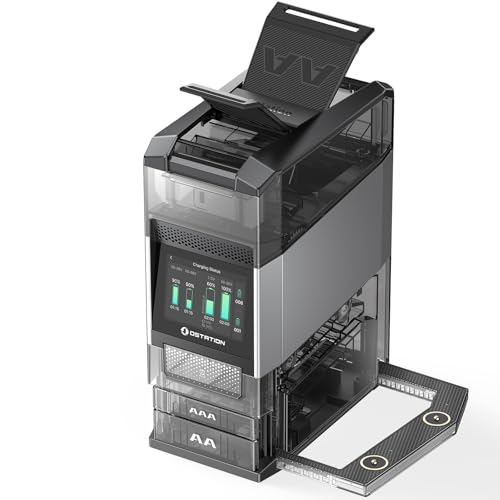
Ostation 2 and Ostation 2 Pro charging stations can hold up to 24 batteries, arranged for as many as 12 AA and 12 AAA cells. This drop-in design also avoids polarity alignment, making large charging sessions less tedious than handling individual cable connections.
Count the batteries your household typically exhausts during one week, then choose enough capacity for that workload with some room left over. A smaller charger may be more sensible for a desk drawer, while a larger station pays off when multiple devices use rechargeable cells daily.
3. Charging Speed and Current Control
Charging speed matters when you need a fresh set before work, travel, gaming, or an evening event. However, the fastest advertised time is meaningful only when you know how many batteries were charged and which chemistry was used.
The Ostation stations state that four batteries, using two AA and two AAA cells, can charge in about two and a half hours. Their value is not simply speed, because the system adjusts charging behavior according to battery conditions instead of treating every cell identically.
Compare charging time for a realistic batch rather than one ideal cell. Faster is useful, but carefully managed current can protect battery life, reduce heat, and deliver better long-term value than an aggressive charger with limited monitoring.
4. Automatic Detection and Polarity Protection
Automatic detection reduces mistakes by checking whether a battery is present, identifying its condition, and controlling the charging process. Polarity protection is equally important because inserting a cell incorrectly can damage equipment or create unnecessary heat.
The Ostation stations use drop-in charging, so you do not need to align each battery manually. Their system checks, charges, sorts, and organizes cells, which is especially helpful when several family members use the charger.
Look for language covering reverse polarity, bad-cell detection, and automatic termination. If a charger requires you to inspect every indicator continuously, it may be less convenient than a system that handles routine decisions automatically.
5. Battery Testing and Health Information
A charger with testing functions can reveal whether a battery is charging normally or becoming unreliable. This prevents weak cells from being returned to a device, where they may cause short runtimes or inconsistent performance.
Both Ostation 2 charging stations combine charging, testing, and organization. They can isolate bad batteries, while the smart system provides charge information and, for compatible Ostation lithium cells, cycle count and health data.
Use testing information to retire cells that repeatedly fail verification rather than repeatedly charging them. For a simpler setup, basic status indicators may be enough, but heavy users benefit from seeing which batteries are dependable before placing them in high-drain devices.
6. Safety Systems and Temperature Management
Rechargeable batteries generate heat, especially when several cells charge together or when a battery has aged. Temperature control helps limit stress, while layered protection reduces risks associated with overcharging, excessive current, and electrical faults.
Ostation describes thermo-adaptive charging that adjusts current according to each battery’s temperature. Its listed protection measures address overcharge, overcurrent, overheating, overvoltage, and short circuits, giving buyers several safeguards to compare.
Place any charger on a hard, ventilated surface away from fabrics and direct sunlight. Safety features cannot compensate for damaged batteries, blocked ventilation, water exposure, or mixing unsupported cells with compatible ones.
7. Voltage, Capacity, and Device Requirements
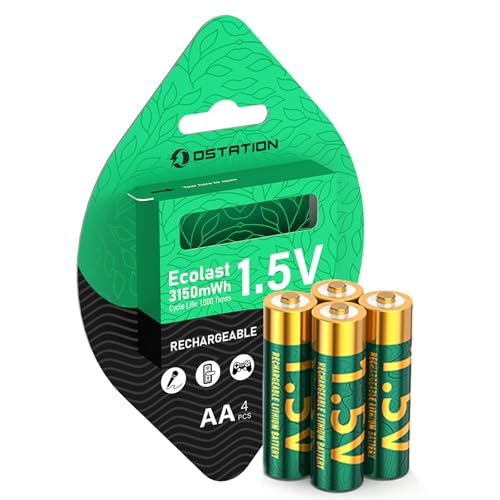
AA and AAA labels describe physical size, not identical electrical behavior. NiMH rechargeable batteries commonly deliver approximately 1.2 volts, while Ostation’s lithium AA batteries maintain a stated 1.5-volt output.
Stable voltage can benefit voltage-sensitive equipment, including some security cameras, doorbell cameras, flashlights, microphones, and controllers. Capacity ratings also matter, but milliamp-hours alone do not guarantee longer runtime when voltage and device requirements differ.
Read the device manual before switching chemistry, especially for equipment with strict voltage limits. A useful energy estimate is watt-hours, calculated by multiplying volts by amp-hours, although actual runtime also depends on temperature, load, and battery age.
8. Organization and Everyday Workflow
Organization is easy to overlook until loose batteries accumulate in drawers, backpacks, and charging cables. A station that separates healthy cells from failed ones can make the entire recharge routine faster and more reliable.
Ostation’s smart sorting places healthy AA and AAA batteries into dedicated compartments while isolating unsuitable cells. This turns the charger into a storage system rather than another temporary pile on a countertop.
Choose a design that fits your actual storage location and leaves room to remove batteries comfortably. A large capacity is useful only when the station remains accessible, visible, and easy for everyone in the household to use correctly.
9. App Controls and Firmware Support
Connected controls can provide more detail than a simple row of lights, including individual charge levels and estimated charging time. They are most useful for people managing many batteries or monitoring specialized lithium cells.
Ostation 2 Pro adds touchscreen and app control, while Ostation 2 uses an app for control and monitoring. The app requires a 2.4 GHz Wi-Fi connection, and daily use does not require constant app access after setup.
Consider whether you want connected features before paying for them, because a basic user may prefer physical controls. If you choose an Ostation 2 Series model, connect the app after setup and check for available firmware updates.
10. Accessories and System Compatibility
Some charging stations serve more than AA and AAA batteries, which can reduce the number of separate chargers in a workspace. The practical benefit depends on whether those extra connections match equipment you already own.
The Ostation 2 Pro includes dual MCC magnetic charging ports for compatible Olight flashlights, including Baton, Warrior, and ArkPro series. This feature is specialized, so it should influence the decision only if you own compatible lights.
List the devices you expect the charger to support before comparing models. For broader household buying advice, our guide to reliable auto battery brands shows why compatibility should come before headline features.
| Comparison point | Ostation 2 Pro | Ostation 2 | Ostation lithium AA batteries |
|---|---|---|---|
| Main role | Charging station, tester, organizer | Charging station, tester, organizer | Rechargeable AA battery set |
| Battery support | NiMH AA and AAA, compatible Ostation lithium AA | NiMH AA and AAA, compatible Ostation lithium AA | 1.5V lithium AA |
| Maximum station capacity | Up to 24 batteries | Up to 24 batteries | Four batteries in the listed pack |
| Smart features | Touchscreen, app, sorting, health information | App, sorting, health information | Built-in battery management system |
| Special consideration | Includes dual MCC ports for compatible Olight lights | Focused on core charging functions | Requires a compatible charger sold separately |
Why You Should Trust Us
We shortlisted these products by comparing the supplied specifications, stated compatibility, charging functions, safety systems, capacity, monitoring tools, and intended use. The comparison separates a complete charging station from a rechargeable battery pack, because those products solve related but different problems.
Our recommendations also consider feature tiers, including automatic sorting, temperature-adaptive charging, battery health information, app support, and specialized flashlight connectivity. We do not claim physical testing, laboratory measurements, or independent runtime results that are not supported by the available product data.
Because battery technology and availability can change, readers should confirm current compatibility and included features before ordering. We keep the comparison focused on documented specifications and update the guidance when the product information changes.
Final Thoughts
Our best overall choice is the Ostation 2 Pro AA AAA Battery Charging Station because it combines broad NiMH support, compatible lithium charging, testing, sorting, app access, touchscreen control, and extra Olight connectivity. It is especially persuasive for heavy users who value a central station and detailed battery information.
For a more focused feature set, the Ostation 2 Smart AA AAA Battery Charging Station is our best value pick among the charging stations. It retains the large capacity, automatic drop-in charging, smart sorting, thermal-adaptive controls, and app monitoring without the Pro model’s additional flashlight ports and touchscreen emphasis.
The Ostation 1.5V AA Rechargeable Lithium Batteries are our best specific-use pick for devices that benefit from steady 1.5-volt output and extended high-drain performance. They make the most sense when paired with a compatible charger and used in equipment such as flashes, controllers, microphones, or outdoor cameras.
Whichever route you choose, start with chemistry and device compatibility before considering capacity or connected features. Readers comparing household equipment can also explore our Uncategorized product guides and Home and Living recommendations for related buying decisions.
FAQs
What is the top-rated option among Best Battery Charger for AA and AAA Batteries in 2026?
The Ostation 2 Pro AA AAA Battery Charging Station has the strongest feature combination in this comparison. Its capacity, testing, sorting, thermal management, app tools, touchscreen, and compatible flashlight ports suit demanding users.
Can one charger handle both AA and AAA batteries?
Yes, the Ostation charging stations are designed for both NiMH AA and AAA batteries. Their separate capacity arrangement supports simultaneous charging without requiring individual polarity alignment.
Can I charge regular alkaline batteries?
No, disposable alkaline batteries should not be placed in a rechargeable battery charger. Use only battery types explicitly approved by the charger manufacturer.
Are lithium AA batteries compatible with every AA charger?
No, lithium rechargeable AA batteries can require specific charging controls and verification. Ostation states that its stations support Ostation 1.5V lithium rechargeable AA batteries, but other lithium batteries are not supported.
What does a battery tester add to a charger?
A tester helps identify cells that are weak, unhealthy, or unsuitable for continued use. This is useful when several batteries look identical but deliver noticeably different runtimes.
How many batteries should a household charger hold?
Choose capacity based on your weekly usage and the number of devices sharing the battery supply. Up to 24 slots are helpful for busy homes, while occasional users may prefer a smaller footprint.
Does faster charging always mean a better charger?
No, speed should be balanced against temperature control, battery chemistry, and charging accuracy. A charger that manages current carefully may preserve useful battery life better than one focused only on minimum charging time.
What does 1.5V output mean for rechargeable AA batteries?
A steady 1.5V output can help voltage-sensitive devices maintain consistent operation. Always confirm that the device accepts the selected battery chemistry before replacing NiMH cells with lithium models.
Do I need Wi-Fi to use an Ostation 2 charger?
The app connection uses 2.4 GHz Wi-Fi for setup, updates, and connected monitoring. Ostation states that daily charging can work without the app after the initial configuration.
How should rechargeable batteries be stored?
Store them in a cool, dry place away from metal objects, moisture, and direct heat. Keeping charged and failed cells separated reduces confusion and helps prevent unsuitable batteries from returning to service.