A dedicated PC compartment gives your gaming tower a defined home instead of leaving it exposed beside your chair or beneath tangled cables. The right desk can also combine monitor support, storage, charging access, lighting, and a surface large enough for comfortable play.
We compared 7 desks from brands including SEDETA, Korfile, Furologee and more, focusing on the details that affect daily use rather than decorative features alone. This guide helps you avoid common mistakes such as buying a compartment that cannot fit your tower, choosing a shallow desktop, or overlooking difficult cable routing.
Room layouts and gaming hardware continue to vary, so flexibility matters more than a dramatic appearance. If you are also improving your home workspace, our guide to Furniture & Comfort products offers additional ideas for creating a more practical room.

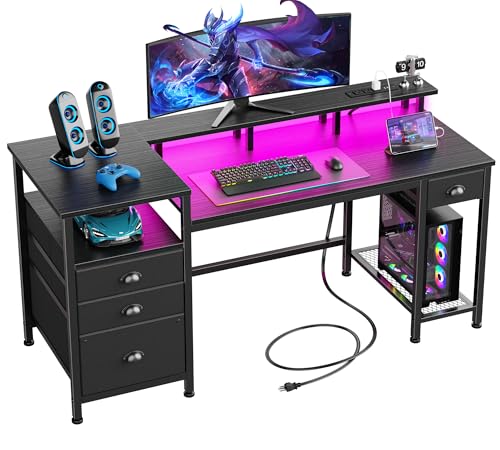


How to Choose Best Gaming Desks with PC Compartment
1. PC Compartment Size and Compatibility
The compartment is the defining feature, but compatibility depends on width, height, depth, and the position of your computer’s feet or glass panels. Measure the tower itself, including protruding cables, before comparing a desk’s advertised shelf dimensions.
A small shelf may suit a compact or mid-tower case while restricting airflow around a larger build. Leave clearance around intake and exhaust vents, and remember that a desktop display stand is different from an enclosed lower compartment.
As a practical rule, measure the tower at its widest and deepest points, then add several inches for ventilation and cable bends. The AODK 67 Inch Gaming Desk with Storage Shelves emphasizes an extra-wide tower shelf, while the Gaming Desk with PC Display Stand is designed for elevated showcase-style cases.
2. Desktop Width and Working Depth
A desk can hold your PC successfully yet still feel cramped when the monitor, keyboard, mouse, microphone, and speakers share one surface. Consider the equipment you use simultaneously, not merely the diagonal size of your primary display.
Width determines whether two monitors or a wide monitor and laptop can coexist, while depth affects viewing distance and wrist comfort. A raised monitor shelf can recover surface area, but it should not force the screen too close to your face.
Before buying, sketch the desktop footprint with masking tape on your floor or existing table. The Furologee 60" Black Computer Desk with 4 Drawers provides a broad work area and full-size monitor stand, whereas a compact desk may better suit a bedroom or dorm.
3. Layout Flexibility and Reversible Parts
Reversible shelves and drawers are valuable when a desk must fit around a door, window, bed, or corner. They also make it easier to change your room later without replacing the entire workstation.
Check whether reversible installation applies to the tower shelf, drawers, hutch, and storage unit, because some designs only move one accessory. Review the assembly diagrams carefully if you need a specific left-handed or right-handed configuration.
The SEDETA L Shaped Gaming Corner Desk with Drawers offers several configurations, including corner and longer arrangements. Korfile models also provide reversible installation, making them useful choices for rooms where furniture placement is constrained.
4. Ergonomics and Monitor Height
Comfort depends on more than surface area. A monitor shelf should place the screen near eye level, while the desktop should leave enough knee clearance for a relaxed seated posture.
When seated, your elbows should remain close to your body and your forearms should rest roughly parallel with the floor. If a raised shelf is too tall, it may create shoulder tension even though it appears useful for organization.
Adjust your chair first, then measure the height from the floor to your preferred screen position. The Korfile 47 Inch Gaming Computer Desk with Power includes a high-rise monitor stand intended to raise viewing height, which may benefit long gaming or work sessions.
5. Construction, Stability, and Load Support
A stable frame prevents monitor shake, keyboard movement, and unwanted noise during everyday use. Pay attention to the frame material, crossbars, adjustable feet, desktop thickness, and the support beneath the PC shelf.
Load capacity should include the monitor, speakers, accessories, and tower rather than the tower alone. Glass-sided cases can be surprisingly heavy, especially after adding a large graphics card and multiple drives.
Metal frames and adjustable leg pads are particularly helpful on uneven floors. The Korfile 48" Gaming Desk with Power Outlet, LED lists reinforced construction and adjustable non-slip feet, while the Gaming Desk with PC Display Stand uses a steel frame for heavier showcase builds.
6. Cable Management and Power Access
Integrated outlets and USB ports reduce the need for loose power strips, but they do not automatically create safe cable management. Look for enough room behind the monitor and openings that let cords reach the tower without crossing your knees.
Separate high-draw equipment from smaller accessories when possible, and avoid overloading an integrated power strip. Keep power connections away from areas where drinks, dust, or feet can disturb them.
The HLDIRECT 44 Inch Gaming Desk with Power Outlets includes AC outlets and USB ports, while the Furologee desk also provides built-in charging access. These features are convenient for controllers, phones, headsets, and other lower-power devices.
7. Storage for Accessories and Displays
Storage should match what you actually own. Fabric drawers work well for cables, controllers, documents, and smaller accessories, while open shelves are more useful for printers, speakers, books, and visible collectibles.
Measure your largest accessory before assuming a drawer will solve clutter. A pegboard can keep headphones and controllers within reach, but it needs enough wall clearance and should not interfere with monitor positioning.
The SEDETA desk combines a display cabinet, pegboard, and five fabric drawers. AODK’s 67 Inch Gaming Desk with Storage Shelves adds a full-width hutch, side shelves, and drawers for people who want storage and display space together.
8. Lighting and Setup Atmosphere
RGB lighting can personalize a gaming space, but its usefulness depends on placement, controls, brightness, and whether the strip creates glare on the monitor. Lighting beneath a shelf usually produces softer ambient color than a strip aimed directly toward your eyes.
Compare the available colors, dynamic modes, brightness settings, remote or app controls, and music synchronization. More modes are not automatically better if the controls are inconvenient or the strip cannot be replaced easily.
The SEDETA desk offers app-controlled lighting with many color and flashing options, while Korfile desks provide customizable RGB effects. Treat lighting as a secondary feature after size, stability, comfort, and tower compatibility.
9. Assembly Requirements and Long-Term Maintenance
Desks with hutches, drawers, shelves, and power systems require more assembly than simple tabletop frames. Clear labels, complete hardware, and logical instructions can make a substantial difference during setup.
Check the room where assembly will happen, because a long desktop may need open floor space for turning and alignment. Two people can make tall hutches and L-shaped sections safer to position, even when the instructions describe solo assembly.
Clean fiberboard with a lightly damp cloth, avoid standing water near power components, and periodically tighten accessible fasteners. Products such as the HLDIRECT and Korfile desks emphasize labeled parts and included tools, which may simplify installation.
| Feature | Best question to ask | Useful comparison point |
|---|---|---|
| PC storage | Will my tower fit with ventilation space? | Measure width, height, and depth |
| Desktop | Can all daily equipment fit comfortably? | Compare width and usable depth |
| Power | Are outlets placed safely and conveniently? | Count ports and plan cable paths |
| Storage | Will drawers fit my accessories? | Compare drawer type and shelf clearance |
| Frame | Will the desk remain steady? | Review supports, feet, and materials |
For broader home organization ideas, the Home & Living category can help you coordinate a gaming area with the rest of your room. The main trade-off is straightforward: larger desks provide more flexibility, while compact designs preserve floor space.
Why You Should Trust Us
We built this comparison from the supplied product specifications, listed features, stated construction details, and available product positioning. We focused on measurable decisions such as desktop dimensions, tower placement, charging access, storage, monitor support, reversibility, and frame stability.
Products were shortlisted across different setup needs rather than judged by appearance alone. Compact desks, larger workstations, L-shaped designs, showcase stands, and storage-focused models each serve different rooms and hardware combinations.
We do not claim physical testing where the available information does not support it. Features and availability can change, so our comparison should be read alongside the current manufacturer or retailer listing before purchase.
Final Thoughts
Our best overall choice is the SEDETA L Shaped Gaming Corner Desk with Drawers because its reversible layout, display cabinet, pegboard, drawers, charging station, and lighting cover many setup needs. It is especially compelling when one workstation must support gaming, study, storage, and shared room organization.
For value-conscious shoppers, the Korfile 48" Gaming Desk with Power Outlet, LED offers a practical mix of reversible PC storage, drawers, hooks, RGB lighting, and charging ports. Its compact footprint suits smaller rooms, provided your equipment fits the available desktop and tower shelf.
Our specific-use recommendation for panoramic cases is Gaming Desk with PC Display Stand. Its elevated display platform is designed to make a glass-sided PC the visual centerpiece while keeping drawers and a side display shelf available for daily organization.
If storage and display capacity matter most, consider the AODK 67 Inch Gaming Desk with Storage Shelves. For a more compact setup, the HLDIRECT 44 Inch Gaming Desk with Power Outlets and Korfile 47 Inch Gaming Computer Desk with Power provide useful charging and storage features in smaller formats.
FAQs About Best Gaming Desks with PC Compartment
What makes a gaming desk with PC compartment useful?
It gives the computer tower a designated location while freeing nearby floor space and reducing cable clutter. Depending on the design, it may also raise the PC for display or keep it away from dust and accidental contact.
Will a PC tower overheat inside a desk compartment?
It can if the compartment blocks intake or exhaust vents and leaves little surrounding clearance. Measure the case and preserve open airflow around the ventilation areas instead of pushing the tower tightly against panels.
Are L-shaped gaming desks suitable for small rooms?
They can be efficient when placed in a corner, but their depth and return section still require careful measurement. A reversible L-shaped design is more adaptable when doors, windows, or furniture limit placement.
How much desktop space does a dual-monitor setup need?
That depends on monitor widths, stands, and whether speakers or a microphone share the surface. Measure the combined equipment width and leave additional room for mouse movement and comfortable keyboard placement.
Are built-in outlets safe for gaming accessories?
They are convenient for ordinary accessories when used within the desk’s electrical specifications. Avoid overloading the strip, keep liquids away, and connect high-draw equipment according to the manufacturer’s guidance.
Do RGB desk lights improve gaming performance?
RGB lighting does not increase frame rates or reduce input latency. Its value is atmospheric and organizational, although moderate indirect lighting may make a dark room more comfortable for some users.
Is a monitor shelf better than a monitor arm?
A shelf provides simple elevation and often adds storage, while an arm offers greater positioning flexibility and frees more desktop area. Choose based on monitor weight, mounting compatibility, and whether you need adjustable viewing angles.
What is the top-rated option among Best Gaming Desks with PC Compartment in 2026?
The SEDETA L Shaped Gaming Corner Desk with Drawers stands out for its combination of flexible configuration, storage, power access, lighting, and display organization. Your room dimensions and tower measurements should still determine final suitability.
Can fabric drawers hold gaming equipment?
Fabric drawers are useful for lightweight controllers, cables, documents, and accessories. They are less appropriate for very heavy equipment or items that need rigid protection from impact and compression.
Should the PC compartment be reversible?
Reversibility is helpful when your room layout may change or when you prefer the tower on a particular side. Confirm that the shelf genuinely supports both orientations and that cable openings remain accessible after installation.