

Older 3D projectors remain useful for shoppers who want a large image without demanding the newest streaming features. Their strongest advantages are often proven display hardware, broad connectivity, and enough brightness for movie nights, classrooms, offices, or gaming rooms.
We compared 7 models from brands including ViewSonic, BenQ, Epson and more, covering DLP, 3LCD, Full HD, WXGA, and XGA designs. This guide helps you separate genuine home theater candidates from novelty lighting products, while avoiding common mistakes involving throw distance, 3D compatibility, lamp age, and image resolution.
For readers also improving other parts of the household, our guide to best luggage for international travel offers another practical comparison built around durability and everyday value.




Buying Guide for Best Older 3D Projectors
1. Native Resolution and Image Detail
Native resolution describes the physical pixel structure used to create the image. Higher resolution normally produces cleaner subtitles, sharper menus, and more convincing 3D depth, especially when the picture becomes large.
Full HD 1920 by 1080 models such as the BenQ TH575, Epson Home Cinema 2040, and Optoma HD146X are better suited to films and modern consoles. WXGA can look attractive for general viewing, while XGA is more appropriate for presentations or casual entertainment.
Do not confuse a projector accepting a signal with one displaying that signal natively. If your priority is Blu-ray 3D or detailed gaming, choose native Full HD where possible, then confirm the source and glasses support the same format.
2. Brightness for Your Room
Brightness determines how well an image survives ambient light, larger screen sizes, and 3D glasses that reduce perceived light. A projector that looks excellent in a dark room may appear washed out near windows or overhead lighting.
Compare ANSI lumens rather than vague marketing descriptions. The BenQ TH575 lists 3800 ANSI lumens, the BenQ MX525 lists 3200, and the ViewSonic PJD5533W lists 3000, making these models more flexible for brighter spaces.
As a practical starting point, dark movie rooms can work with moderate brightness, while living rooms usually benefit from at least 2500 ANSI lumens. More brightness is not automatically better, because excessive output can reduce perceived black depth in a dark theater.
3. Genuine 3D Compatibility
The phrase 3D projector can describe several different experiences. Home theater projectors may support frame-packed or sequential 3D sources, while a galaxy projector may create animated visual patterns without displaying stereoscopic movie content.
Before buying, identify your source, such as a Blu-ray player, console, computer, or streaming device. Then check whether the projector accepts that signal, whether compatible active or passive glasses are required, and whether glasses are included.
For actual 3D films, prioritize models with documented home theater features, suitable HDMI connectivity, and a compatible refresh format. Treat the AIRIVO 3D Galaxy Projector as room décor and ambient entertainment rather than a replacement for a cinema projector.
4. Throw Distance and Screen Size
Throw distance is the space between the lens and the screen, and it determines whether a projector fits your room. A projector may create a large image, but the required distance can be inconvenient in a small bedroom or narrow apartment.
Use the manufacturer’s screen-size guidance instead of assuming every model behaves alike. The Epson Home Cinema 2040 is listed for a 90-inch image from eight feet, while the ViewSonic PJD5533W lists a 76-inch image from that distance.
Measure from the planned lens position to the screen before ordering. Leave room for cables, ventilation, and mounting adjustments, and remember that a bigger image also demands more brightness and reveals softness more readily.
5. Contrast and Dark-Scene Performance
Contrast affects the difference between bright highlights and dark areas. It matters most during nighttime scenes, space films, shadowy games, and 3D content where poor separation can make depth feel flat.
Published contrast figures are useful for comparing models from one manufacturer, but they are not perfectly standardized. Room lighting, screen color, calibration, and brightness mode can influence the result more than a single headline number.
The Epson Home Cinema 2040 lists a 35,000:1 contrast ratio, while the ViewSonic PJD5533W lists 15,000:1. Use those figures as context, then favor a controlled room and a projector with credible home theater specifications.
6. Connectivity and Source Support
Older projectors can remain convenient when they offer the right ports for your equipment. HDMI is the essential connection for most current players, streaming sticks, laptops, and consoles, while VGA, composite, audio, and legacy ports may help with older devices.
The Epson Home Cinema 2040 provides two HDMI connections, including one MHL port, plus composite, stereo audio, VGA, and USB Type A. The ViewSonic PJD5533W includes HDMI, S-Video, VGA, composite video, audio, RS-232, and Mini USB.
Count your sources before purchase and decide whether you need an external switch. Check HDCP and audio behavior as well, because some projectors display video but require separate speakers or an AV receiver for sound.
| Model | Display type | Native resolution | Brightness | Notable use |
|---|---|---|---|---|
| BenQ TH575 | DLP | 1080p | 3800 ANSI lumens | Gaming and bright rooms |
| Epson Home Cinema 2040 | 3LCD | 1080p | 2200 lumens | Home theater and 3D |
| ViewSonic PJD5533W | DLP | WXGA | 3000 lumens | Flexible presentations |
| BenQ MX525 | DLP | XGA | 3200 ANSI lumens | Office and classroom use |
7. Input Lag and Motion Handling
Input lag is the delay between an action on a controller and the resulting image. It is less important for ordinary films, but highly relevant to racing games, sports titles, rhythm games, and competitive multiplayer.
The BenQ TH575 specifies 16ms at 1080p and 60Hz, which gives it a clear advantage for responsive gaming. Its Game Display Mode and Full HD resolution also make it easier to enjoy large, detailed images from a console.
When lag information is unavailable, avoid assuming that a bright business projector will be gaming-friendly. Disable unnecessary image processing when possible, and connect the console directly rather than routing it through multiple devices.
8. Lamp Life, Condition, and Maintenance
Older projectors often represent excellent value, but lamp condition can change the ownership experience. A used lamp may be dimmer, require replacement sooner, or show color and brightness inconsistency after extensive operation.
Look for stated lamp-life figures and distinguish normal mode from Eco mode. The BenQ MX525 lists up to 10,000 hours, the ViewSonic PJD5533W also lists up to 10,000 hours, and the Epson Home Cinema 2040 lists up to 7,500 hours in Eco mode.
Ask sellers about operating hours, included remote controls, filter cleaning, and warning indicators. Keep vents unobstructed, allow the fan to complete its cool-down cycle, and budget for a replacement lamp if buying older inventory.
9. Keystone Correction, Placement, and Noise
Keystone correction digitally reshapes an image when the projector is not square to the screen. It can solve minor placement problems, but heavy correction reduces usable image area and may soften fine detail.
The ViewSonic PJD5533W offers vertical correction of plus or minus 40 degrees, while several home theater models emphasize straightforward installation. Lens shift is preferable when available because it moves the image optically without the same level of digital scaling.
Fan noise also matters during quiet scenes. Place the projector farther from seating when possible, use Eco mode for nighttime viewing, and avoid enclosing it inside furniture where heat and noise can accumulate.
10. Warranty, Accessories, and Total Value
Total value includes the projector, glasses, cables, speakers, replacement lamp, mounting hardware, and possible adapters. A lower initial cost may become less attractive if essential accessories are missing or difficult to source.
Warranty coverage provides additional confidence, particularly with older stock or refurbished equipment. The ViewSonic PJD5533W lists three years for parts and labor, while the Epson Home Cinema 2040 lists a two-year limited warranty in its supplied specifications.
Compare what arrives in the box and verify return conditions before purchase. For broader household buying advice, the Uncategorized category page provides additional product comparisons.
Why You Should Trust Us
We built this comparison from the supplied product specifications, stated display technologies, resolution information, connectivity, brightness, installation features, lamp-life claims, and documented use cases. We did not treat every product labeled 3D as an equivalent home theater projector.
Our shortlist considers how each model solves a different shopping problem. We separated Full HD cinema and gaming options from older office projectors, then considered whether a compact galaxy projector belongs in an ambient-lighting category rather than a movie category.
Because availability and specifications can change, we recommend checking the current listing, included accessories, warranty terms, and compatibility before ordering. Our approach is transparent: recommendations reflect published data and practical trade-offs, not claims of hands-on testing.
Final Thoughts on Best Older 3D Projectors
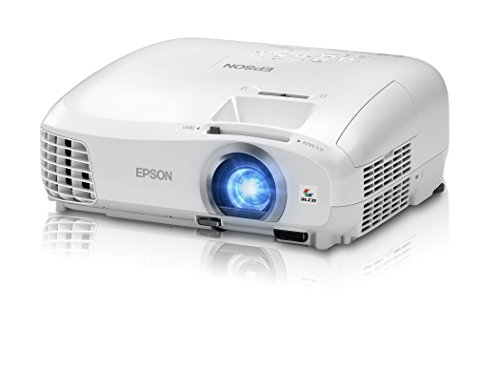
Our best overall choice is the Epson Home Cinema 2040 1080p 3D 3LCD Home Theater because it combines native Full HD resolution, 3D home theater positioning, useful HDMI connectivity, and a strong contrast specification. It is especially appealing for movie viewers who can control room lighting and want balanced image quality.
Our best value pick is the BenQ DLP Video Projector – XGA Display for offices, classrooms, and casual presentations. Its bright output, HDMI and dual VGA connections, compact format, and long stated lamp life matter more for practical work than cinema-level resolution.
For gaming and bright-room entertainment, choose the BenQ TH575 1080p 3800 Lumens Home Entertainment. Native 1080p, high brightness, a stated 16ms response time, and a gaming display mode make it the most purpose-built option for responsive big-screen play.
The ViewSonic PJD5533W WXGA 3D DLP Home Theater is worth considering when flexible placement, legacy ports, and broad installation features are priorities. For room atmosphere rather than movie 3D, the AIRIVO 3D Galaxy Projector offers dynamic scenes, Bluetooth, focus adjustment, and automatic shutoff features.
Before choosing, measure the room, identify the source format, and decide whether gaming speed or cinema detail matters more. Readers comparing practical home products can also visit our Home and Living category for related buying guidance.
FAQs About Best Older 3D Projectors
Are older 3D projectors still worth buying?
Yes, older models can still provide an enjoyable large image when their lamp, ports, and source compatibility meet your needs. They are less suitable when you require built-in streaming, the newest gaming features, or effortless wireless setup.
What is the top-rated option among Best Older 3D Projectors in 2026?
The Epson Home Cinema 2040 is a strong home theater candidate because it combines Full HD resolution, 3D positioning, and multiple useful inputs. The best choice still depends on room lighting, screen distance, and the equipment providing the video signal.
Can every 3D projector play 3D Blu-ray movies?
No, a projector must support the relevant 3D signal format, and the player must send a compatible output. You may also need active glasses, an emitter, suitable cables, and a receiver that passes the signal correctly.
Do 3D glasses come with older projectors?
Not necessarily, especially when purchasing discontinued, refurbished, or used equipment. Confirm the listing contents and match glasses with the projector’s technology rather than assuming universal compatibility.
Is DLP or 3LCD better for home theater?
Neither technology wins in every room. DLP models often offer crisp motion and compact designs, while 3LCD projectors can provide strong color brightness and natural-looking images.
How bright should a projector be for a living room?
A living room with daylight usually benefits from a brighter model than a dedicated dark theater. Start by considering at least moderate ANSI brightness, then account for screen size, curtains, and whether 3D glasses will reduce perceived light.
Can an older projector work with a modern streaming stick?
It can if the projector has compatible HDMI and the streaming device can output a supported resolution. Audio may require separate speakers because many older projectors provide limited sound or no convenient audio routing.
What should I check when buying a used projector?
Check lamp hours, image uniformity, focus across the screen, fan noise, remote operation, input ports, and warning messages. Ask whether the projector was stored safely and whether a replacement lamp is available.
Are more lumens always better?
No, excessive brightness can make black areas look gray in a dark room. The right output balances ambient light, screen size, color performance, and the viewing mode you expect to use.
What screen size works best for 3D viewing?
A larger screen increases immersion, but it also magnifies softness and reduces brightness per square foot. Choose a size that fits the throw distance and keeps your normal seating position comfortable.



