

Small businesses often manage lighting, climate, security, media, and customer comfort across several rooms. The right controller can replace scattered apps with dependable routines that save attention during busy operating hours.
We compared 7 options for different automation styles in September 2026, from simple infrared control to advanced local processing. This guide helps you avoid buying a controller that cannot support your devices, network, staff, or future expansion.
Automation needs change as quickly as connected-device standards, so compatibility matters more than a long feature list. If you are also improving other parts of a property, our Home & Living category guides provide additional practical buying advice.




Buying Guide for Best Home Automation Controllers for Small Businesses
1. Device Compatibility and Protocol Support
Compatibility determines whether a controller can operate the devices you already own and the products you may add later. Check support for Wi-Fi, infrared, radio frequency, Zigbee, Thread, Matter, Bluetooth, or proprietary systems.
Do not assume that Matter support makes every feature universal, because device functions can vary between ecosystems. Aqara Smart Home Hub M3 for Advanced Automation supports Aqara Zigbee and Thread devices, while Broadlink Rm4 Pro with Sensor focuses on infrared and compatible fixed-code RF equipment.
Make a device inventory before purchasing, including model numbers and communication methods. A controller that supports ninety percent of your equipment may still be the wrong choice if the missing ten percent includes essential lighting, access, or climate controls.
2. Local Processing and Internet Dependence
Local processing allows routines to continue when a cloud service or internet connection becomes unavailable. That matters for businesses where lighting, temperature, alerts, and scheduled equipment should not stop during a temporary outage.
Home Assistant Green | Smart Home hub is designed around local control and stores home data locally, while Aqara Smart Home Hub M3 for Advanced Automation prioritizes edge automations. Cloud-connected products can still be convenient, but identify which features require internet access.
Ask whether schedules, scenes, sensor triggers, remote access, notifications, and voice commands work independently. For critical routines, use local automation where possible and keep manual wall controls available as a fallback.
3. Network Requirements and Reliability
A controller is only as dependable as the network supporting it. Review Wi-Fi bands, Ethernet availability, router placement, mesh limitations, password requirements, and the number of simultaneous connected devices.
Broadlink Rm4 Pro with Sensor requires a stable 2.4 GHz network and does not support 5 GHz or mesh networks. Aqara Smart Home Hub M3 for Advanced Automation offers wired and wireless connectivity, including a PoE port, which can simplify installations in commercial spaces.
Place the controller where it has a strong network signal and, for infrared products, a clear line toward the equipment. If the business has separate guest and staff networks, confirm that the controller and its devices can communicate across the chosen configuration.
4. Automation Depth and Scheduling
Basic controllers send commands, while more capable platforms combine schedules, sensors, conditions, scenes, and presence triggers. Consider whether you need a simple closing routine or coordinated actions across several rooms and device types.
Useful examples include lowering shades when sunlight increases, adjusting climate settings before opening, or turning off selected equipment after staff leave. Home Assistant Green | Smart Home hub is particularly suitable when different brands must cooperate through detailed automations.
Write three real routines before comparing products, then list their triggers and required actions. If one routine needs conditions such as temperature, occupancy, time, and device status, prioritize a platform with visual or rule-based automation rather than a basic remote.
5. Control Interface and Staff Usability
A controller must be easy for employees to use without constant training. Mobile apps are useful for remote management, but a wall-mounted display or physical button can be faster during customer-facing work.
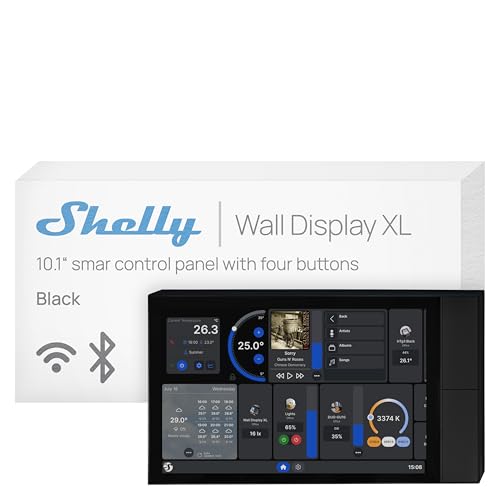
Shelly Wall Display XL Black 10.1 Inch Touchscreen provides a large central interface with customizable buttons and built-in relay switching. SONOFF NSPanel Pro 120 Smart Control Panel adds a screen for energy information, cameras, lighting, thermostats, and other controls.
Separate everyday controls from administrator settings so routine users cannot accidentally change important rules. A practical interface should make common actions obvious, show device status clearly, and provide a manual alternative when automation behaves unexpectedly.
6. Installation, Power, and Physical Placement
Installation complexity affects labor, downtime, and long-term maintenance. Plug-in hubs usually require less disruption, whereas wall displays may involve electrical boxes, wiring, mounting, and professional installation.
Lutron Caseta Smart Hub Compatible with Alexa connects to a router and outlet, making it approachable for lighting-focused deployments. Shelly Wall Display XL Black 10.1 Inch Touchscreen installs in a standard electrical wall box, but its placement should be planned before work begins.
Confirm power adapters, Ethernet cables, USB supplies, mounting hardware, and enclosure requirements before ordering. For a leased property, favor removable equipment unless the owner approves permanent electrical changes.
7. Security, Privacy, and User Permissions
Business automation can reveal occupancy patterns, access schedules, camera feeds, and operating habits. Review account security, encryption, update practices, data storage, and whether the platform supports separate users or permissions.
Aqara Smart Home Hub M3 for Advanced Automation omits microphones and cameras and includes encrypted local storage for configuration information. Home Assistant Green | Smart Home hub also emphasizes keeping household data locally, which may appeal to privacy-conscious operators.
Use unique administrator credentials, enable available multifactor protection, and place smart devices on an appropriate network segment. Keep firmware current and remove former employees from accounts immediately after their access ends.
8. Sensors, Alerts, and Business Monitoring
Sensors make automation responsive instead of purely scheduled. Door, motion, temperature, humidity, energy, and occupancy data can help reduce waste while improving comfort and operational awareness.
Tapo Smart IR & IoT Hub w/ Chime includes a built-in alarm and can connect with Tapo sensors for alerts. Broadlink Rm4 Pro with Sensor displays temperature and humidity readings, allowing those measurements to trigger climate routines.
Decide which events deserve immediate notifications and which should simply trigger an automation. Too many alerts create fatigue, so reserve urgent messages for conditions requiring action and review sensor placement to prevent false triggers.
9. Expansion Capacity and Ecosystem Fit
A small installation can grow quickly after employees see the value of automation. Check supported device limits, accessory availability, integration quality, and whether new devices can be added without replacing the central controller.
Lutron Caseta Smart Hub Compatible with Alexa supports a substantial Caseta device ecosystem, while Aqara Smart Home Hub M3 for Advanced Automation supports sizeable Aqara Zigbee and Thread deployments. These strengths are useful when you expect to standardize on one ecosystem.
Map likely additions for the next two years, including lights, sensors, shades, thermostats, and security devices. Buying for the immediate room alone can cost more later if expansion requires new apps, hubs, or rewiring.
| Business priority | Useful controller type | What to verify |
|---|---|---|
| Legacy appliances | Infrared hub | Appliance library and line of sight |
| Lighting control | Lighting ecosystem hub | Switch compatibility and device capacity |
| Mixed-brand automation | Local automation platform | Protocols, integrations, and offline operation |
| Central room control | Wall display panel | Wiring, relay rating, interface access, and mounting |
For adjacent equipment decisions, our guide to heating, cooling, and air products can help when climate control is central to your automation plan. Treat the controller as part of a complete operating system rather than an isolated gadget.
Why You Should Trust Us
We shortlisted these controllers by comparing published specifications, verified feature descriptions, connectivity options, installation requirements, and the type of automation each platform supports. We considered both focused controllers and broader ecosystems because small businesses have very different starting points.
Our analysis separates directly stated capabilities from assumptions about compatibility. We paid particular attention to network restrictions, protocol support, local processing, sensor integration, interface design, and expansion paths instead of treating every smart hub as interchangeable.
Product information, availability, and supported integrations can change, so this comparison is designed around verifiable specifications and practical decision criteria. We do not claim hands-on testing where the supplied data does not support that conclusion.
Final Thoughts
Our best overall recommendation is Home Assistant Green | Smart Home hub for businesses combining products from several brands. Its preinstalled platform, local data approach, silent hardware, and expansion through USB adapters make it a strong foundation for detailed routines.
For straightforward value, choose Tapo Smart IR & IoT Hub w/ Chime. Its broad infrared compatibility, Matter certification, remote app control, voice support, alerts, and scheduling suit offices that need to control existing appliances without a large installation.
For lighting-centered environments, Lutron Caseta Smart Hub Compatible with Alexa is the specialized choice. It offers a focused ecosystem, broad smart-home integrations, and a setup that avoids competing with ordinary Wi-Fi traffic.
Businesses wanting a visible shared control point should consider Shelly Wall Display XL Black 10.1 Inch Touchscreen. Review your wiring and relay needs first, then compare the interface against your staff workflow and planned device ecosystem.
Before deciding, match the controller to your most important routine, not its most impressive specification. Our Home & Living buying resources can also help you plan the surrounding equipment and operating environment.
FAQs
What is the top-rated option among Best Home Automation Controllers for Small Businesses in 2026?
Home Assistant Green | Smart Home hub is a strong overall option for mixed-brand environments requiring advanced routines and local control. It is less specialized than a lighting-only hub, but its flexibility can reduce ecosystem limitations.
Can a smart controller operate older televisions and air conditioners?
Infrared hubs can often control older televisions, air conditioners, fans, and media equipment. Confirm that the appliance appears in the controller library or supports command learning before purchasing.
Do home automation controllers need a separate hub for every brand?
Not always, because Matter bridges and broad platforms can combine devices from multiple manufacturers. Proprietary accessories may still require their own bridge, so check the exact device and integration path.
Will automations work if the internet goes down?
Some local platforms continue running schedules and sensor routines without internet access, while cloud-dependent products may lose important functions. Review offline behavior for every routine that affects business operations.
Are wall-mounted control panels better than phone apps?
A wall panel can be faster for shared spaces because employees can see and use it without unlocking a phone. A mobile app remains valuable for remote access, administration, and notifications.
What network band should a small business use for smart hubs?
Many controllers rely on 2.4 GHz Wi-Fi because it offers useful range and broad device support. Always check whether the product supports dual-band networking, Ethernet, or restrictions involving mesh systems.
Can automation controllers reduce business energy use?
They can reduce waste by scheduling lights, climate equipment, and appliances around occupancy or operating hours. Savings depend on device compatibility, sensible rules, and whether staff continue using manual overrides.
How many smart devices can one controller manage?
Capacity varies by protocol, ecosystem, network design, and device type. Check the manufacturer limit for your specific accessories, then leave room for future sensors, switches, shades, and climate controls.
Are Matter controllers compatible with every Matter device?
Matter improves cross-platform compatibility, but individual device types, commands, and ecosystem implementations can differ. Confirm the functions you need, not merely the presence of a Matter logo.
What security practices should a business follow?
Use unique administrator credentials, update firmware, separate smart devices appropriately, and remove former users promptly. Limit camera, alarm, and remote-control permissions to employees who genuinely need them.



